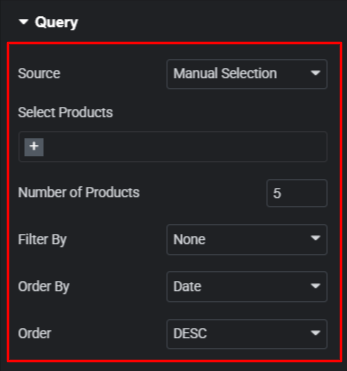

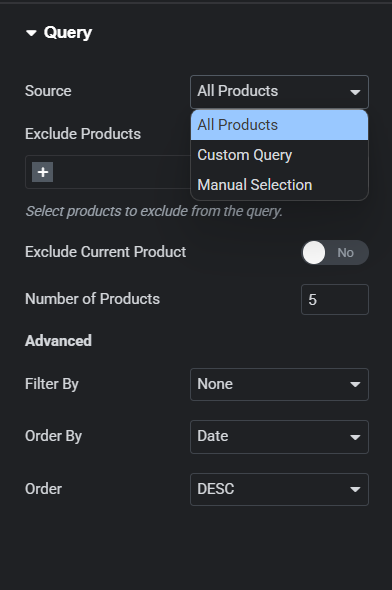
In Query Section you will see Source control in which you can have three different option
- All Products
- Custom Query
- Manual Selection
All Products #
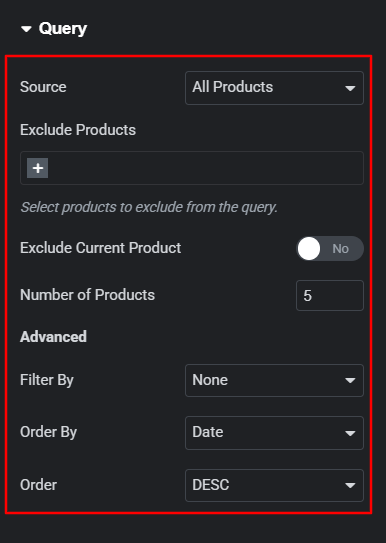
In All Products you will see latest products in your page.
Exclude Products – remove selected products from your page.
How to Setup Product Numbers
In All Product option use the Number of Products option to set the number of products in your page.
Advance Features
In All Product option you will find advance features where you will see following controls:
- Filter By
- Order By
- Order
Filter By
Use Filter By control to filter out the featured and sales products.
Order By
In Order By Control you can find following options which will helps you to manage your product accordingly.
- Date
- Title
- Price
- Popularity
- Rating
- Random
- Menu Order
Order – Use Order control to manage your product in ascending and descending order.
Custom Query #
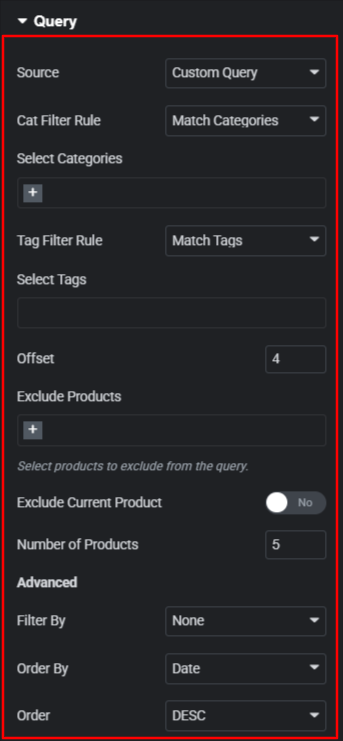
Display Product according to selected query.
- Cat Filter Rule
- Tag Filter Rule
Cat Filter Rule
Display Product according to the selected product Categories. Contains two major select option Match Categories and Exclude Categories.
Tag Filter Rule
Display Product according to the selected product Tags. Contains two major select option Match Tags and Exclude Tags.
Offset – Enable the query to skip a certain number of product starting output.
Exclude Products – remove selected products from your page.
How to Setup Product Numbers
In Custom Query use the Number of Products option to set the number of products in your page.
Advance Features
In Custom Query you will find advance features where you will see following controls:
- Filter By
- Order By
- Order
Filter By
Use Filter By control to filter out the featured and sales products.
Order By
In Order By Control you can find following options which will helps you to manage your product accordingly.
- Date
- Title
- Price
- Popularity
- Rating
- Random
- Menu Order
Order Use Order control to manage your product in ascending and descending order.
Manual Selection #
In Manual Selection Use Select Products option to display products.
How to Setup Product Numbers
In Manual Selection option use the Number of Products option to set the number of products in your page.
Advance Features
In Manual Selection you will find advance features where you will see following controls:
- Filter By
- Order By
- Order
Filter By
Use Filter By control to filter out the featured and sales products.
Order By
In Order By Control you can find following options which will helps you to manage your product accordingly.
- Date
- Title
- Price
- Popularity
- Rating
- Random
- Menu Order
Order Use Order control to manage your product in ascending and descending order.